
Every stop, simplified.
Plan and optimize routes, manage pickups and deliveries, and dispatch drivers, all from one place.
50 tasks per month free·Unlimited drivers·No credit card requiredAn animated illustration of a working day in Toover: an order with a linked pickup and delivery is created, assigned to a driver, optimized, sent to the driver's phone and completed with a photo and a signature.

Built for
Same-day runs across a team.
Plan the day’s deliveries, split them across drivers, and see every drop-off confirmed.
Get started free- Add the day’s jobsDeliveries with time windows
- Optimize and assignOne route per driver
- Proof on every dropPhotos and signatures back in the dashboard
Linked pickups and drop-offs.
Create orders that link each pickup to its delivery. Optimization keeps the pickup first.
Get started free- Create an orderPickup + delivery, linked
- Optimize with rulesPickup before delivery, windows kept
- Track both legsPicked up, then delivered
Your store, your drivers.
Turn the day’s orders into routes for your own drivers and get every delivery out on time.
Get started free- Add today’s ordersAddresses and delivery windows
- Build routesGrouped by driver and area
- Confirm deliveryPhoto or signature at the door
Tight windows, hot food.
Schedule pickups from your kitchen and deliveries inside narrow windows, with breaks planned in.
Get started free- Set pickup timesFrom your kitchen
- Respect delivery windowsPlan around set times
- Close out the eventNotes and photos returned
Visits, not packages.
Schedule technician visits with time windows and breaks, then track each job to completion.
Get started free- Add visitsWith time windows and notes
- Plan the dayVisits and breaks in order
- Close each jobNotes, photos, signature
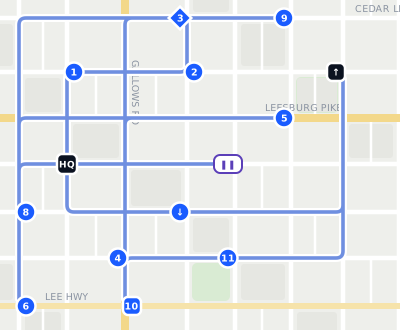
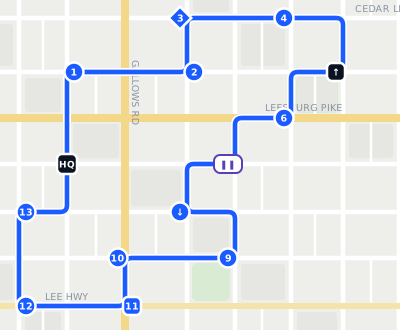
Watch a messy route get fixed.
13 stops entered in the order they came in, with a linked pickup and delivery, time windows, and a lunch break.
- Pickup before delivery
- Green Fork window 12:30–1:00
- 30-min break kept
- Starts and ends at HQ
From first pickup to final stop.
Keep your routes, drivers, and jobs organized from start to finish.
Every job, organized.
Add pickups, deliveries, and visits. Link related stops, set time windows, and keep everything in one place.
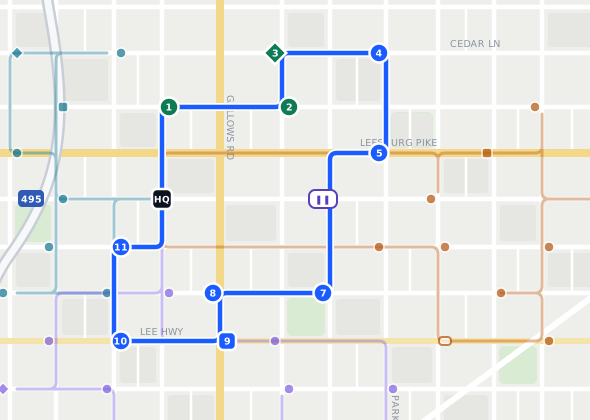
Better routes. Less backtracking.
Optimize stop order, plan around your schedule, and assign routes to drivers.
Assign it once. It’s on their phone.
Drivers receive their work in the Toover app, with the route and job details ready to go.
Know when the job’s done.
Get completion updates, photos, signatures, and notes back in your dashboard.
Your routes. Your way.
Plan stops, optimize your route, and navigate from your phone.
Personal plans are set up and managed in the Toover app.Your entire operation. One place.
Plan jobs, dispatch drivers, and keep track of work across your team.
Explore Teams plans Driving for a team? Sign in to the app with the account your dispatcher set up for you. You don’t need a Personal plan.Four drivers, one view.
Breaks, reassignments, and a missed delivery, handled from the same dashboard.
Illustrative example. Each task keeps its own history in the dashboard.
Assign it here. They see it there.
Create or assign work in the dashboard. Drivers receive it in the app, and updates flow back as each stop is completed.
- 01 · DashboardOrderGreen Fork Kitchen → Owen ParkPickup 12:30 PM · delivery by 2:00 PMAssign toDRV002 · Default Team
- 02 · Driver appRoute 1 · 13 stops04 · Green Fork Kitchen05 · Owen Park
- 03 · Back on the dashboardCompletedOwen ParkPhoto · signature · notesDRV0025/13 tasks
- Pickups and deliveries
- Linked orders
- Breaks
- Time windows
- Teams and drivers
- Proof of completion
Your routes go with you.
Plan stops, follow your routes, and manage assignments with Toover on iOS and Android.
Planning your own routes?
Get Toover and choose Personal.
Driving for a team?
Get Toover and sign in with the account your dispatcher set up for you.
Plans for teams of every size.
Start free. Pay for more tasks as your operation grows.
Basic
- Tasks included1,000
- Each additional task$0.099
- DriversUnlimited
Pro
- Tasks included2,000
- Each additional task$0.09
- DriversUnlimited
- Basic and Pro include a 7-day free trial.
- Every plan includes unlimited drivers.
- Create your workspace and start dispatching right away.
Start your first route in minutes.
Create your workspace, add your stops, and start dispatching. Free to get started.